
AI VIDEO PRODUCTION
Best AI video model routes for product launch content.
A launch video has to do more than look cinematic. It must show the product, make the benefit obvious, and give the viewer a reason to click, save, or learn more. This guide helps you choose the right video route for that job.
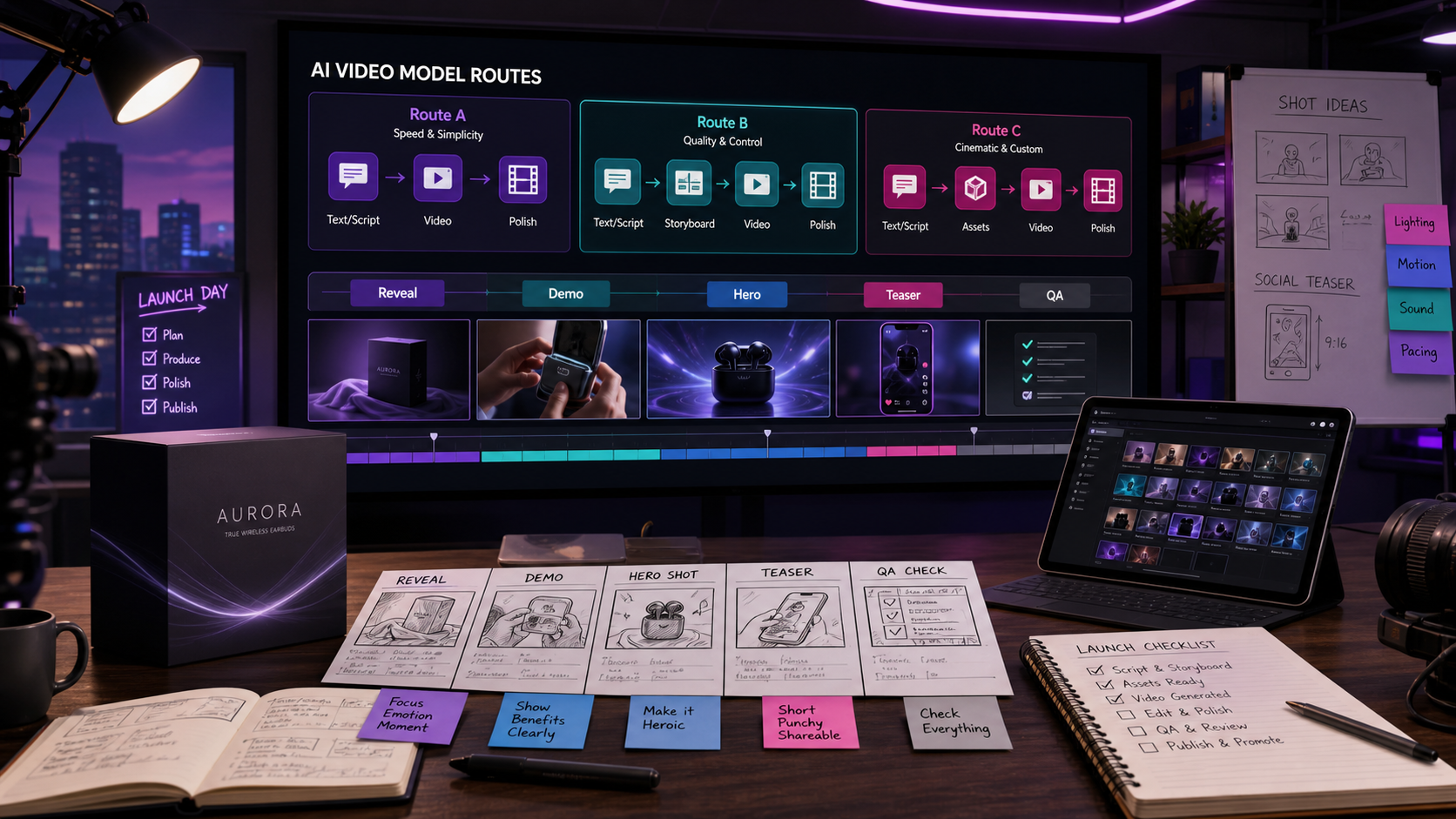
Summary for fast readers
- Use the model route that matches the launch asset: reveal, demo, hero scene, teaser, or QA-heavy variant.
- Choose cinematic routes when you need emotional product storytelling, and faster routes when you need many social variants.
- Verify resolution, duration, product accuracy, text legibility, commercial terms, and platform crop before publishing.
WHY THIS WORKS
The right model route depends on the launch asset, not the model name.
A teaser, hero clip, feature demo, and social ad all need different levels of speed, control, reference matching, and polish. Choosing by asset job keeps the workflow practical.
EXAMPLE BRIEF
Start with a real brief, not a vague prompt.
Product: a new AI writing assistant for e-commerce teams. Launch message: turn product notes into publishable product-page copy. Needed assets: one hero clip, three short social teasers, one feature demo, and paid ad variants.
ASSET PLAN
Match each launch asset to a video route.
Hero product clip
Use a more controlled route when the launch moment needs brand polish and a clean final frame.
Fast social teasers
Use a fast route to test several hooks before polishing.
Reference-led product story
Use references when product look, UI, or brand mood matters.
Native-audio story ad
Use audio-aware video when dialogue, ambience, or sound effects carry the idea.
Supporting thumbnails
Turn the strongest frame into a cover image or ad visual.
Copy and caption pack
Write captions and hooks around the exact video angle that wins.
STEP-BY-STEP WORKFLOW
Use video models as a launch testing system.
- Define the launch moment. Are you revealing the product, explaining a feature, or creating curiosity?
- Generate fast route options. Test multiple hooks before investing in polish.
- Pick one hero route. Choose the version with the clearest product story and final frame.
- Refine with a model guide. Use Seedance, Kling, or Veo guidance based on control, speed, and audio needs.
- Create the surrounding assets. Make thumbnail, caption, and ad variants from the winning video direction.
PROMPTS TO COPY
Use these as starting points, then add your product details.
Create a 12-second product launch hero video for [product]. Opening: [problem]. Middle: [product action]. End: clean final frame with headline space. Style: [brand mood], camera: [movement], lighting: [style].
Create three short video concepts for [product launch]. Each should open with a different hook: pain point, surprising benefit, and product reveal. Keep all versions suitable for vertical social.
Create a concise feature demo video concept showing [feature] solving [problem]. Include screen or product moment, clear transition, and final CTA frame.
BAD PROMPT VS BETTER PROMPT
Small prompt changes create more usable assets.
| Weak prompt | Better prompt | Why it works |
|---|---|---|
| Make a launch video. | Create a 12-second launch hero clip for a writing assistant: messy product notes become polished product-page copy, clean SaaS UI mood, smooth camera push, final CTA frame. | It gives narrative, product action, style, and ending. |
| Make it viral. | Create three vertical teaser concepts with different hooks: ?still writing product pages manually??, ?from notes to publish-ready copy,? and ?your next product launch needs fewer docs.? | It makes virality testable through hook variation. |
| Show my feature. | Show an e-commerce marketer pasting bullet notes, the tool generating product copy, and the final page becoming ready to publish. | It defines the sequence instead of naming only the feature. |
DELIVERY CHECKLIST
Before you publish, check the asset pack.
First two seconds
Does the viewer immediately understand the product or problem?
Product visibility
Is the product or benefit actually visible, not only implied?
Final frame
Can you add headline, logo, or CTA without clutter?
Asset reuse
Can the best frame become a thumbnail or ad image?
ACTION PLAN
Your 30-minute launch video sprint.
- Minutes 0-5: Define the launch job: teaser, feature reveal, founder story, product demo, or paid-social hook.
- Minutes 5-15: Test two model routes with the same brief so the team can compare motion, clarity, and polish.
- Minutes 15-25: Keep the strongest clip direction and create a thumbnail, caption set, and landing-page hero line.
- Minutes 25-30: Check whether the first two seconds communicate the product and whether the final frame can hold CTA text.
EEAT CHECK
How to judge video-model claims responsibly.
Model announcements change quickly, so treat public claims as starting points rather than finished production advice. For a launch campaign, the best evidence is a dated test using your own product images, brand constraints, aspect ratios, and target channels.
Test the same brief
Use one fixed prompt across routes so differences in motion, product fidelity, pacing, and CTA space are easier to compare.
Review the output package
Judge the final video alongside thumbnail, caption, ad hook, landing-page angle, and commercial review notes.
FAQ
Common questions.
Which AI video model route is best for product launches?
The best route depends on the asset job. Use cinematic routes for hero scenes and product reveals, faster routes for social variants, and stricter QA routes when product details or text accuracy matter.
Should product launch videos always use the highest resolution?
Not always. 4K can be useful for premium launch assets and repurposing, but platform crop, compression, text-safe areas, and product accuracy matter just as much.
What should marketers verify before publishing AI launch videos?
Verify product fidelity, claim accuracy, commercial rights, platform rules, audio fit, CTA clarity, and whether the asset still matches the launch brief.
MAKE IT REAL
Test your launch message while the creative direction is still flexible.
Try it free, generate one fast draft and one polished route, then choose the version that makes you want to write the launch caption immediately.